
Controls & service planning
Freeze Dryer Software Updates: Version and Restart Checks
Before changing a freeze dryer’s software, the owner needs three clear answers: why the update is needed, which release fits the machine, and how the results will be checked.
This guide is written for small food businesses using retail or small freeze dryers. It uses Harvest Right as a concrete manufacturer example; its version rules do not apply to other brands or industrial PLC systems.
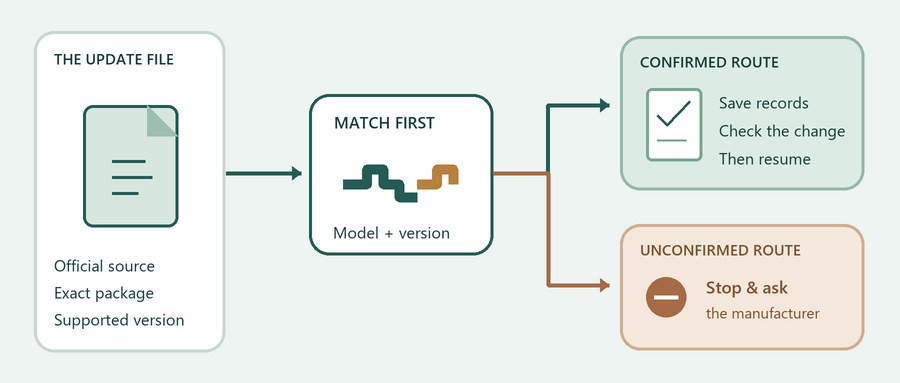
The starting point: follow the instructions from the manufacturer for the exact model and installed version. Before starting, confirm any hardware requirements and identify a supported recovery route if the update fails. Save the records the controller actually allows, then check the intended change before returning the machine to routine production.
A newer version number alone does not show that an update fits the machine or improves the product. Reaching the home screen after a restart does not establish that a food batch is dry or ready for sale.
Decide what the update must solve
Start with the problem or function rather than the download. The owner should be able to state the reason in a single sentence: a manufacturer notice affects this unit, a documented defect needs correction, or a supported feature would help the operation.
These situations require different treatment. A critical security or defect notice deserves prompt attention through the manufacturer’s supported process. An optional convenience feature can be weighed against potential downtime, hardware requirements, and the value it brings to daily work.
CISA’s business-software guidance calls for patching procedures and tests, with priority given to critical vulnerabilities. It is general security guidance, not a freeze-dryer installation procedure or evidence of a vulnerability in a named machine.
For a planned feature change, choose a window when the unit can be taken out of routine use and technical support is reachable. Ask the manufacturer how the machine should be left before the update, including whether a batch must be completed first. General advice about automatic computer updates does not give permission to reboot a process controller during an active batch.
Match the update to the exact machine
Photograph the identification plate and the screen displaying the full software version. Record the model, serial number, controller details if available, and the proposed package. Similar cabinet styling or a matching first version digit is not enough to choose an update.
Ask the manufacturer to confirm the supported path from the installed version to the proposed version. This confirmation is vital when a support page lists several generations of downloads: the presence of an available link does not make it the right file for every unit.
A bounded example: Harvest Right
The manufacturer’s current support page, checked on 9 November 2026, separates the following routes. Recheck that page before acting; this table is a reading aid, not approval for a particular machine.
| What is installed or being purchased? | What the current source says | What to confirm |
|---|---|---|
| Software beginning with v5.4 or v5.5 | The version 6 upgrade section identifies these installed branches as eligible. | The exact unit, full version and current OEM package/instructions. |
| v5.0, v5.1, v5.2, v5.3 or lower | The same section excludes these branches from version 6 and Wi-Fi eligibility. | The supported maintenance route for the older machine; do not assume an intermediate update creates eligibility. |
| A Wi-Fi Adapter Kit | The dongle comes with version 6 preloaded and has its own instructions. | Hardware eligibility and the instructions supplied with the kit. |
| Legacy update links on the support page | A separate warning directs units already on 5.4 or 5.5 away from the older update section. | Ask support if an older link and the current warning appear to conflict for the unit. |
Check the return path first. The OEM states that once updating to version 6 has begun, earlier versions cannot be restored through a supported rollback. It also warns against interrupting the update. These are manufacturer-specific conditions, not a claim that every unsuccessful update damages a controller.
Check what the upgrade actually includes
A software release and a connectivity kit can be different purchases. Before comparing offers, list the needed function and ask which hardware, software, account, and support arrangements deliver it.
The current Harvest Right Wi-Fi offer includes a USB adapter, version 6 software and the app. It names PRO models and Countertop 360, subject to hardware constraints. It also describes support access to settings, batch history and performance data with the owner’s approval. Confirm eligibility and permissions for the exact unit; an older feature article may not list every current model.
| Offer element | Question to settle before ordering |
|---|---|
| Software and target version | Which installed branch and controller does this release support? |
| Adapter or controller hardware | Is a component required, included and supported on this serial number? |
| App and connectivity | Which network/account conditions apply, and what works if connectivity is unavailable? |
| Access and records | Who can view or change settings, how is access approved, and which records can the owner retain? |
| Support and commercial terms | What assistance, charges, warranty conditions and recovery arrangements are included in writing? |
Keep feature claims separate from production results. Remote monitoring may offer operational convenience, but a feature list does not establish a shorter cycle, lower cost, or better final product for the business’s own recipe and load. Any such expectation requires a suitable comparison under stated conditions.
Save records that can actually be used
Ask the manufacturer two separate questions: what can be saved, and what can be restored? A readable recipe export, a screenshot, and a controller-program backup serve different purposes. Saving one does not prove that the others exist or that the machine can restore them after a failed update.
Before the change, keep the records the manufacturer permits: machine identity, installed version, relevant settings and recipes, recent alarms, and representative batch records. Open exported files on a separate computer to confirm they are readable. Ask who can perform any supported restoration and what files or tools that person requires.
The company’s freeze dryer service and maintenance guide recommends records of approved changes, backups and comparable baselines. That is service-planning guidance; it does not establish that every retail controller can export or restore a PLC program.
If the manufacturer describes a log-export procedure for a normally operating machine, use it only in that stated condition. It is not automatically a recovery procedure for a machine that will not boot. Keep the original downloaded package name and the source page with the change record so technical support can identify what was attempted.
Define the checks before returning to work
Before installation, write down what should remain unchanged and what the update is intended to change. This gives the owner a clear, practical comparison after the update, rather than relying on the machine merely reaching its home screen.
| Record before the change | Check afterward using the OEM-approved method |
|---|---|
| Full installed version and the approved target | The reported version matches the intended result; record any unexpected message. |
| Recipes, limits and settings relevant to the operation | Required values remain correct or match the approved change. Investigate unexplained defaults. |
| Time stamps, alarms and readable data exports | Required records remain usable and any relevant alarm/display function is checked. |
| The feature or defect that justified the change | Confirm that specific function, including local and remote behavior where relevant. |
| A comparable baseline, where available | Use the manufacturer’s appropriate checks and, when needed, a representative load under comparable conditions. |
For a load comparison, keep the product, preparation, loading, and relevant operating conditions as consistent as practical. Agree on the applicable machine and product criteria before the check. There is no universal vacuum reading, fixed run time, or single test food that this article can use to approve all freeze dryers.
Record the date, old and new versions, approved settings changes, observations, and the person responsible for the decision to resume work. Machine-function checks and product-release checks remain separate: a completed cycle or remote finish notification does not by itself establish the dryness, storage suitability, or sale readiness of a food batch.
If the update stops, preserve the exact state
Follow instructions from the manufacturer for the state actually shown. If the machine appears stuck, the screen is blank, or settings disappear, do not substitute forum advice, guessed power cycles, forced reloads, or unapproved downgrades for manufacturer guidance. A waiting screen and a failed boot can require different actions.
Record the last message or photograph the screen, note the elapsed time, record the installed version if known, the package used, whether a batch is present, and every action already taken. Contact the manufacturer with those details. If instructions from the manufacturer describe a specific interruption or missing-file condition, follow those exact directions; do not generalize them to other screens or machines.
For the Harvest Right example, the current support page warns against interrupting a started update and does not support reverting from version 6 to an earlier version. Its ordinary log-export instructions describe a normally starting machine. They should not be recast here as a failed-update recovery sequence.
If a batch was interrupted, preserve its identity and process history for the business’s product assessment. A recovered display does not decide whether that batch can be released.
Prepare a useful support or equipment request
For an existing machine, send the manufacturer a concise record: model and serial number; the full version before the attempt; the proposed package and official source; the reason for updating; the last screen and timing; any product present; available records; and actions already taken. Ask for the supported next step and the checks needed before routine use resumes.
For a new equipment purchase, ask a different set of questions: which control documents and backups are supplied, who can restore them, how approved software changes are recorded, and how service scope and post-service checks are defined. Settle these requirements in the proposal before a problem occurs.
Planning food-production equipment?
Send the product, intended output, and controls or service-documentation requirements for an equipment discussion. For firmware approval or recovery on another manufacturer’s machine, contact that manufacturer directly.
Sources and scope
- Harvest Right: Customer Support — current software routes, version restrictions and support instructions; checked 9 November 2026.
- Harvest Right: Wi-Fi — offered kit components, stated model scope and permission-based support access; checked 9 November 2026.
- CISA: Update Business Software — general business-security guidance, not a freeze-dryer update procedure.
- Freeze dryer service and maintenance — first-party guidance on baselines, change records and service scope.
This article interprets current public guidance for update planning. It provides no firmware files, model-specific recovery service or claim of measured improvement after an update.

About the Author: Zheng Wei
Founder & Freeze-Drying System Engineer
Fuzhou Xing Shun Da Refrigeration Facility Project Co., Ltd.
Zheng Wei participates in food freeze-drying trials, equipment selection, vacuum-system configuration, refrigeration planning, installation guidance, process optimization, and project handover. The project experience covers fruit, vegetables, cooked foods, seafood, meat, dairy products, herbs, and extracts.